


Clay Review 2026

The leading data‑driven prospecting and B2B GTM automation platform

Right now, Clay tops our shortlist for B2B data enrichment and GTM automation tools - alongside ZoomInfo and Salesforce Data 360.

At Orin, we continuously test and compare leading platforms.

Clay shines when you need live data signals, AI‑powered personalisation, and flexible workflow automation that fit directly into RevOps, Sales, and Marketing operations without heavyweight contracts or complex deployments.

4.6

G2
4.8

Product Hunt

Ratings as of October 2026 · G2, Product Hunt
What problems can Clay solve for your business?

Most GTM and RevOps teams already have a CRM, a data provider, and outreach tools.

The challenge: data is fragmented, enrichment is slow, and personalisation doesn’t scale. Clay fixes this by bringing real‑time enrichment, prospect research, and workflow triggers into one platform.

Stale or incomplete lead data.

Clay enriches contacts and companies in real time from 150+ data providers, with waterfall logic to fill the gaps.

Generic outbound sequences.

Dynamic fields let you personalise at scale with context like funding news, tech stack, or job changes.

Manual prospect research.

Clay automates repetitive research (e.g. scraping job postings, scanning websites) with AI‑driven fields.

Disconnected GTM stack.

Clay integrates natively with Salesforce, HubSpot, Pipedrive, Apollo, and more, syncing enriched leads directly into playbooks.

Time‑consuming data quality assurance.

Clay’s AI checks detect bad emails or mismatched records before pushing them to sales.

Slow intent signal detection.

Clay monitors live data like job changes, website visits and news, alerting sales the moment prospects show buying intent.

Weak customer success insights.

Clay can enrich post‑sale accounts with news and hiring signals, helping CS teams spot churn risks or upsell opportunities.

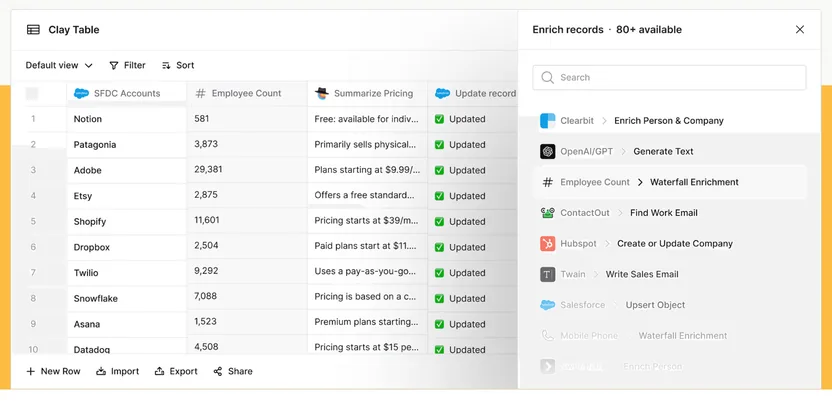
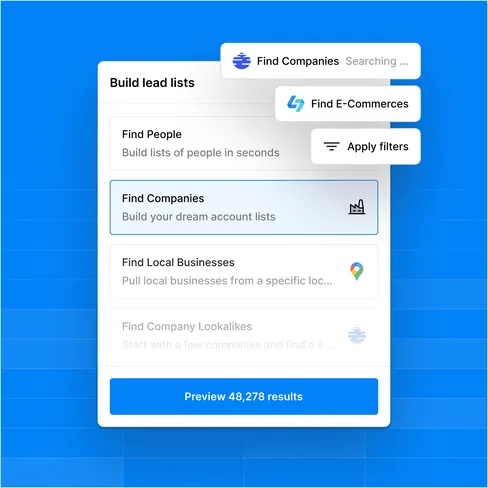
Clay lead list builder
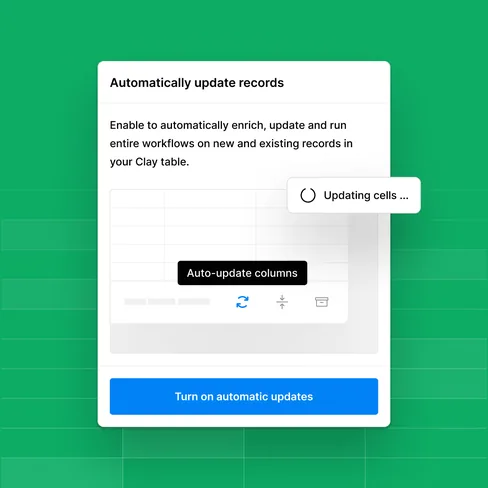
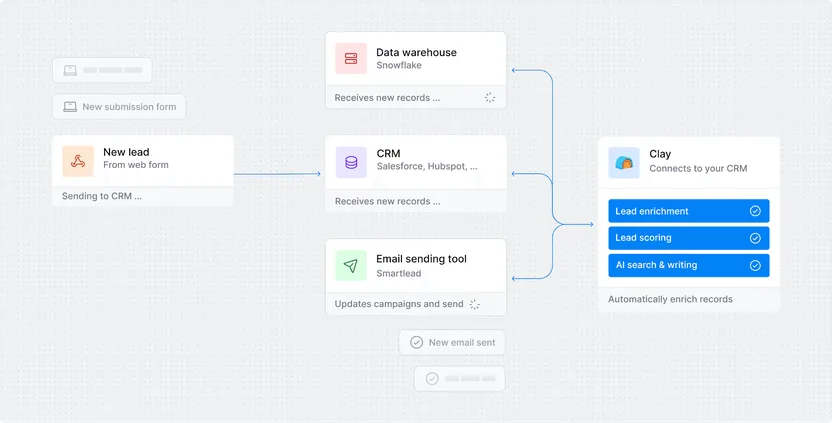
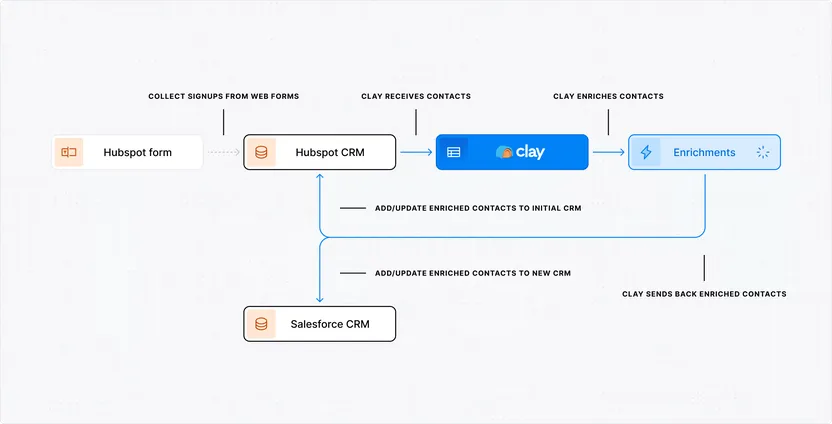
Clay automatic record updates
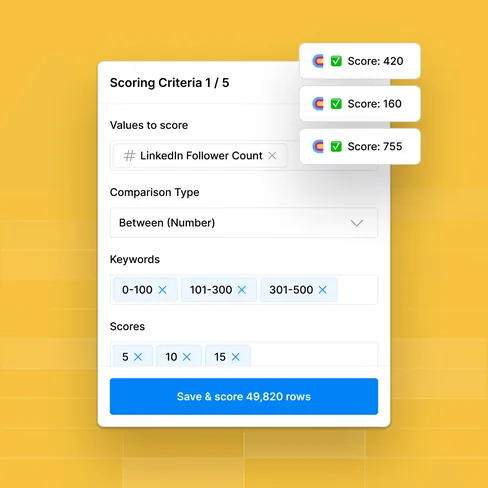
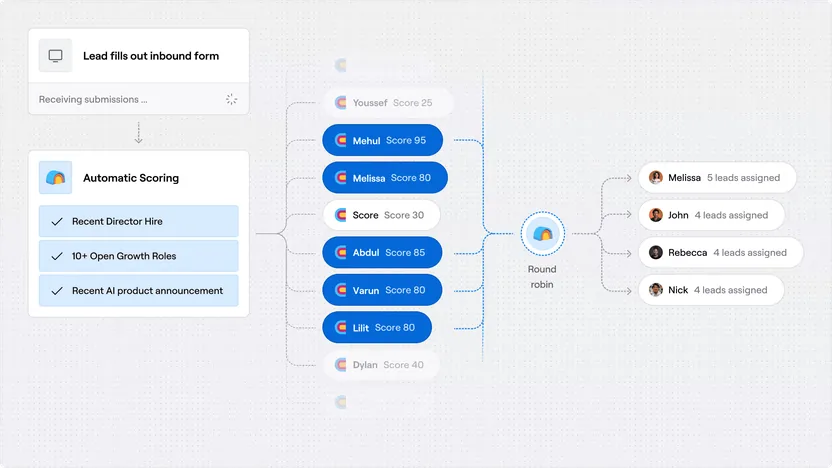
Clay lead scoring criteria
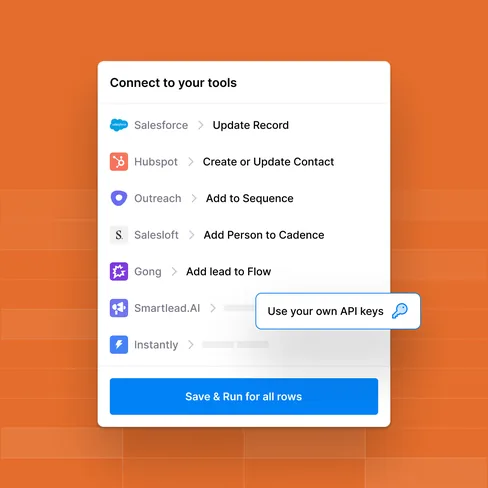
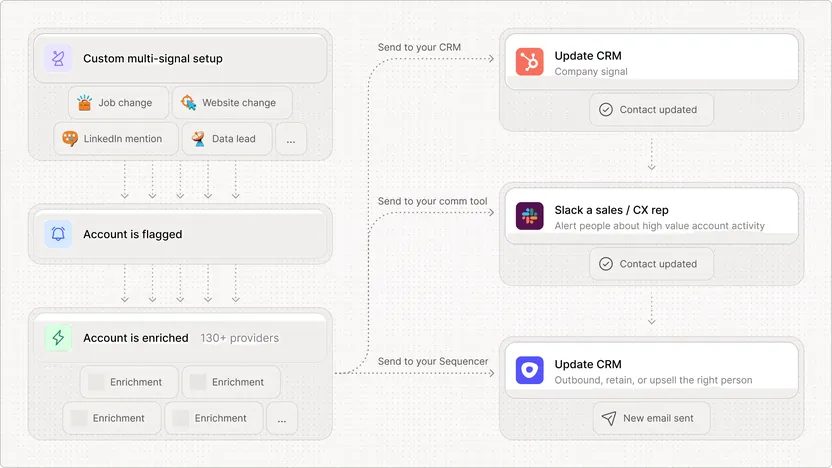
Clay integrations with sales tools

Clay’s core features (2026)

Clay is designed for GTM teams that need fresh data, scalable personalisation, and automation to power modern sales and marketing. Its core features bring research, enrichment, and orchestration into one connected platform.

Data enrichment & research

  • Pull firmographic and intent data from 150+ data providers.

  • Uses waterfall logic to unify results, deduplicate records, and fill gaps automatically.

  • Built‑in email verification and firmographic cleanups.

Integrations & API

  • Native integrations: Salesforce, HubSpot, Pipedrive, Apollo, Outreach, Salesloft, Gong.

  • Webhooks, HTTP API (Growth plan and up) and Clay MCP for ChatGPT, Claude and Codex.

  • Sync audiences to LinkedIn and other ad platforms.

Personalisation at scale

  • Dynamic fields that insert unique insights into outreach messages.

  • AI‑assisted copy suggestions tuned for outbound personalisation.

  • Clay Sequencer: send email sequences straight from Clay.

Clay Tables & Collaboration

  • Workspace to organise enriched leads and workflow outputs.

  • Unlimited seats on every plan; role‑based permissions on Enterprise.

  • Real‑time updates ensure all team members work from the same live data set.

Workflow automation

  • No‑code tables plus a node‑based Workflows canvas to chain enrichment, filters and triggers.

  • Push enriched leads into Salesforce or HubSpot automatically (Growth plan and up).

  • Alert reps in Slack or add matching prospects to Gong Engage flows.

Clay Signals & Triggers

  • Custom alerts on live events (funding, hiring, job changes).

  • Web Intent shows which target accounts visit your website (Growth plan and up).

  • Pushes signals into Slack, email, or CRM tasks instantly.

Clay AI: Sculptor & Claygent

  • Sculptor builds tables and workflows from plain‑English requests.

  • Claygent researches websites and PDFs to generate insights (e.g. “recently expanded to EMEA”).

  • AI validation reduces noise by scoring lead quality before export.

When Clay may not be ideal

  • Heavily regulated enterprises needing HIPAA or FedRAMP compliance should consider Salesforce Data 360.

  • Large companies that need a built‑in dialer and multichannel sequencing may prefer Apollo.io or Outreach.

Clay vs. ZoomInfo vs. Salesforce Data 360 - What each platform does best

Where Clay is better:

  • Real‑time enrichment: waterfalls across 150+ live data providers instead of relying on a single proprietary database.

  • Personalisation at scale: Dynamic fields + AI personalisation make outbound more relevant.

  • Flexible workflow automation: No‑code workflows with direct CRM sync and Clay’s own email sending (Sequencer).

  • Pricing model: Monthly, usage‑based plans (data credits + actions) vs ZoomInfo’s annual contracts.

  • Intent signal agility: Custom alerts on funding, hiring, website visits or tech changes.

  • Collaboration & speed: Multi‑user workspaces with live updates let RevOps and Sales act faster than siloed data pulls.

Where ZoomInfo / Salesforce win:

  • Database breadth: ZoomInfo offers one of the largest proprietary databases, while Salesforce integrates deeply into its CRM ecosystem.

  • Advanced revenue intelligence: Salesforce Data 360 ties directly into CRM objects for cross‑cloud analytics and Agentforce AI.

  • Compliance & governance: ZoomInfo holds SOC 2 Type II and ISO 27001; Salesforce adds HIPAA BAA coverage and FedRAMP High.

  • Native CRM depth: Salesforce Data 360 embeds enrichment directly into CRM objects with no need for external syncing.

  • Scalability for global teams: ZoomInfo’s massive coverage and Salesforce’s infrastructure typically make them better for 1k+ seat deployments.

Who should choose Clay, ZoomInfo, or Salesforce?

Choose Clay if you:

  • Run B2B outbound or marketing campaigns and need fresh, enriched data daily.

  • Prefer usage‑based monthly plans over long annual contracts.

  • Want to personalise outreach with live signals (funding, hiring, etc.).

  • Need fast setup without a complex implementation cycle.

  • Clay is ideal for RevOps and GTM teams who value speed, personalisation, and flexible integrations over static databases.

Choose ZoomInfo or Salesforce if you:

  • Operate in industries where scale of contacts matters more than depth of enrichment.

  • Want built‑in intent data and compliance certifications.

  • Already run your GTM stack on Salesforce and want natively integrated enrichment.

  • Need enterprise‑level governance, compliance, and AI analytics tied to your CRM.

  • ZoomInfo and Salesforce are best for large outbound and enterprise sales, marketing and RevOps teams.

Pro tips for your Clay rollout

Step 1: Complete the groundwork

  • Map your ICP attributes (industry, headcount, tech stack).

  • Define which enrichment signals matter (hiring, funding, etc.).

  • Connect Clay to your CRM and outreach tools before building workflows.

  • Set governance rules for deduplication and verification.

Step 2: Run your first GTM workflows like a pro

  • Start with a “trigger + enrich + push to CRM” workflow.

  • Layer AI personalisation fields into outbound templates.

  • Test enrichment accuracy on a small campaign before scaling.

  • Align RevOps, sales, and marketing on what qualifies as a “ready” lead.

  • Monitor Clay dashboards and credit budgets; tune filters and fields for data quality.

Need help implementing Clay the right way?

Setting up Clay is simple - but building a GTM stack that supports your business model, workflows, and growth plans takes more than just clicking “connect”.

At Orin, we help you design your Clay setup, integrate it with your workflows and tools, and align your reporting with what your team and leadership care about.

Talk to our team → Book a quick call and we’ll get your Clay system up and running the smart way.

Book a quick consultation!

What are the next steps?

  1. 1

    Fill out the form to share your project details with us.

  2. 2

    One of our experts will contact you immediately.

  3. 3

    We'll review your questions and project details together.

  4. 4

    We’ll prepare a quick project calculation or comprehensive proposal for your team.

You can write us a message directly to

hello@oringroup.co.uk

Fill out the form or send us an email. We’ll respond within 24 hours.

Your personal data is protected.