






MailerLite Review 2026

Our preferred lightweight email
marketing platform for SMEs & agencies

Right now, MailerLite tops our shortlist for simple‑to‑use email marketing - alongside Brevo.

At Orin, our team, partners, and clients continuously test the leading email-marketing platforms.

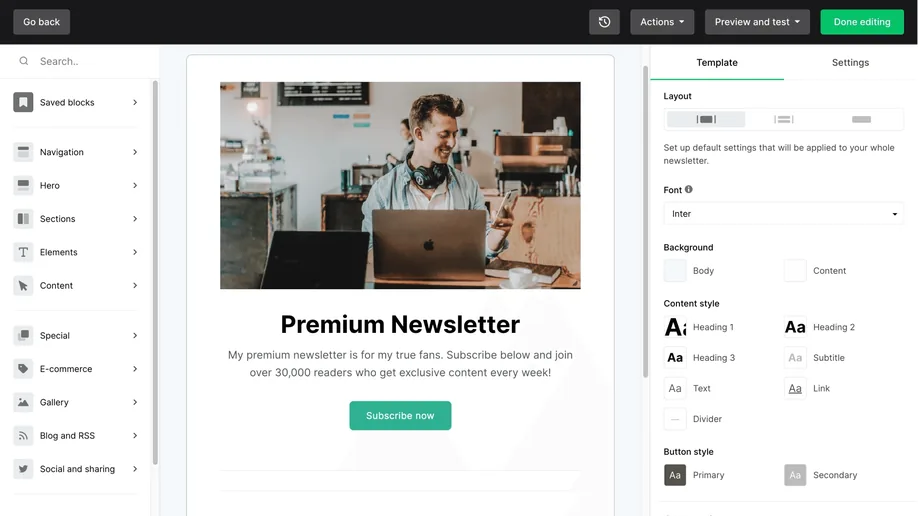
MailerLite stands out for SMEs and agencies that want an intuitive drag-and-drop newsletter builder,
smart automations, and built-in website and landing-page tools.

4.6

Gartner

4.6

G2

8.9

TrustRadius

4.7

Capterra

Ratings as of October 2026 · Gartner Peer Insights, G2, TrustRadius, Capterra
Email marketing sprint example with MailerLite

Short, iterative cycles allow your team to test ideas quickly, reduce campaign risk, and keep messaging aligned with fast-moving customer behaviour.

  • 1. Sprint planning (Monday): Schedule newsletter and automation sends for the week, and define success metrics (opens ≥ 35 %, CTR ≥ 4 %, 50 sign-ups, etc.).

  • 2. Daily stand-up: Review dashboard KPIs for campaigns that went out in the last 24 h. If opens lag, tweak the subject line or timing for tomorrow’s send directly in the editor.

  • 3. Mid-sprint experiment (Wed/Thu): A/B test subject lines, content blocks, or send-time. Let MailerLite automatically select and roll out the winner to the rest of your list.

  • 4. Retrospective (Friday): Dive into click maps to see where subscribers engaged (or dropped). Capture lessons, update templates, segmentation rules, or triggers for next week.

What problems can MailerLite solve for your business?

Complex email tools overwhelm your team.

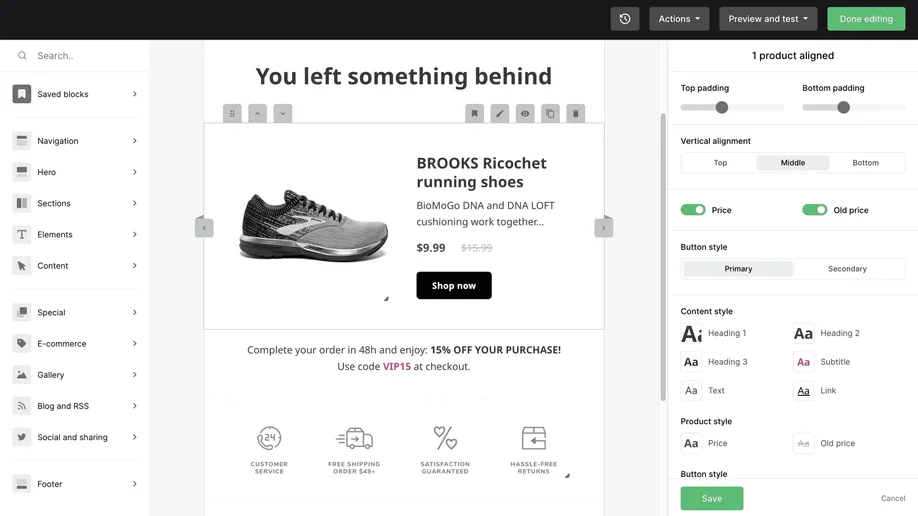
A clean, drag‑and‑drop builder + minimalist UI means anyone can launch a polished campaign in minutes.

Pricing jumps every time your list grows.

Transparent, subscriber‑based tiers (free up to 250 subscribers and 2,500 emails a month; paid Comfort and Power plans above) keep costs predictable.

List quality and deliverability are slipping.

Double opt‑in forms, guided domain authentication and built-in deliverability recommendations keep your list clean and your emails in the inbox.

Separate tools for pop-ups, landing pages, and digital products.

Built-in forms, pop-ups, landing pages, and a full website/blog builder roll lead capture and monetisation into one platform.

Limited engagement insights.

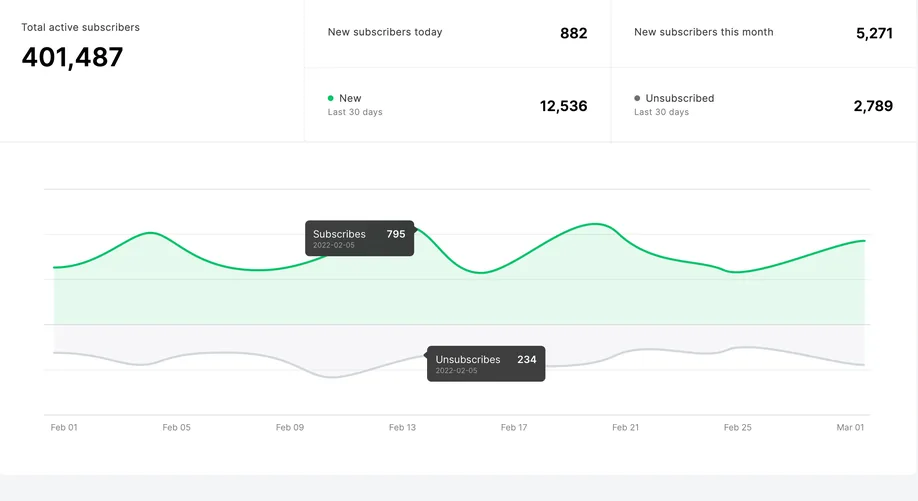
Real‑time dashboards and click maps show opens, clicks and what resonates with your audience.

Clunky editors slow every send.

A minimalist drag-and-drop builder with smart content blocks (surveys, quizzes) lets you craft a polished email in minutes.

No time (or data) to iterate.

Dashboards and A/B testing show what’s working so you can tweak content or send times in your next sprint.

MailerLite abandoned-cart email in the editor
MailerLite newsletter landing page editor
MailerLite subscriber growth dashboard

MailerLite’s core features in 2026

MailerLite’s real-time analytics and instant editor make a weekly cadence easy to maintain, even for lean teams.

Email builder & AI

  • Drag‑and‑drop blocks incl. surveys, quizzes and countdowns.

  • New in 2026: Simple text‑first and custom HTML editors.

  • AI writing assistant (Comfort and up); AI subject lines on all plans.

Analytics & optimisation

  • Real‑time campaign reports and click maps.

  • A/B tests on all plans; Smart Sending for the best send time (Comfort and up).

  • Custom reports (beta, all plans): chart, filter and export your metrics.

Automation workflows

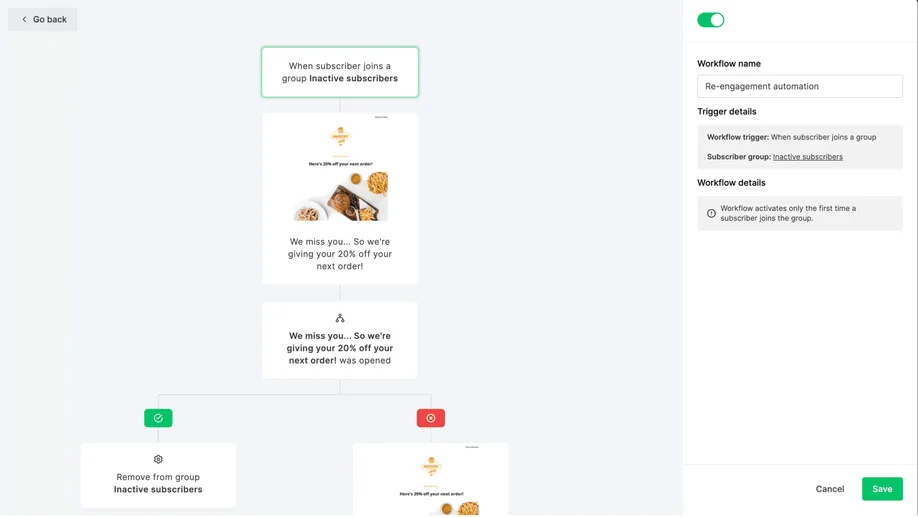
  • Visual workflow editor with branching, delays & conditions.

  • Triggers incl. forms, link clicks, dates and e‑commerce (abandoned cart, purchases).

  • Up to 3 triggers per workflow (Power plan).

Subscriber management

  • Segments, groups & tags.

  • Behavioural segmentation (opens, clicks, purchases).

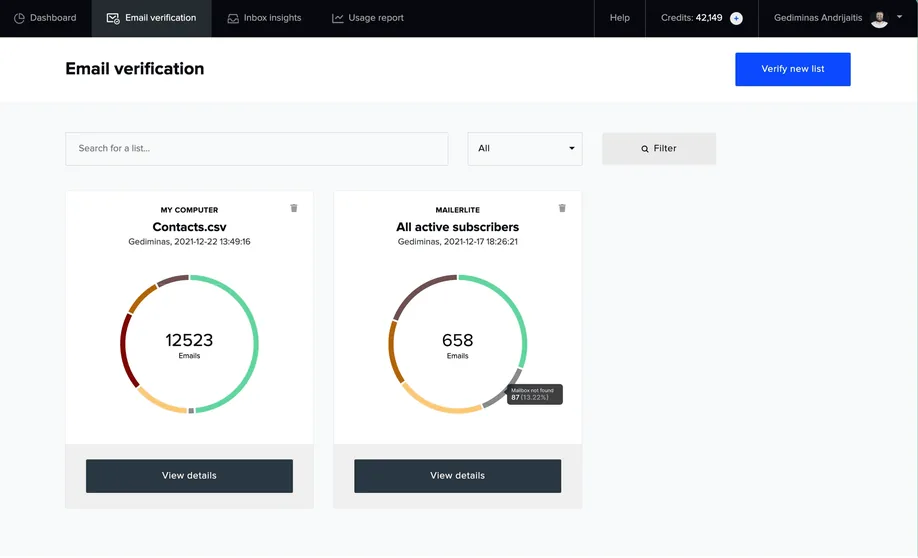
  • Email verification via MailerCheck (separate, pay‑as‑you‑go).

Websites, landing pages & bookings

  • Website and blog builder with free SSL and custom domains.

  • Landing pages, including AI‑generated ones.

  • Sell 1:1 or group sessions with Stripe, 0% commission.

Integrations & selling

  • 100+ integrations (Shopify, Stripe, WordPress, Zapier) and a REST API.

  • Connect Claude or ChatGPT to your account (MailerLite MCP).

  • Sell digital products & paid newsletters (Stripe checkout).

Pop‑ups & forms

  • Double opt‑in & GDPR compliance tools.

  • Embedded, pop‑up, or promo bar forms.

  • Automation triggers on submit (e.g. add to sequence).

When MailerLite may not be ideal

  • Heavily regulated sectors that need on‑prem hosting may still look elsewhere - MailerLite is cloud‑only, though ISO 27001 certified with EU data centres.

  • For large lists that email infrequently, per‑subscriber pricing can cost more than Brevo’s email‑volume plans.

MailerLite vs. Brevo - What each platform does best

Where MailerLite is better than Brevo:

  • Ease of use: MailerLite’s clean UX helps first‑time senders launch a campaign in ~10 minutes vs. the 1‑hour onboarding with Brevo.

  • Content blocks: MailerLite embeds interactive surveys, quizzes, and countdowns natively. Brevo requires widgets or custom code.

  • All the basics on every plan: forms, automations, a website and a landing page are available even on the free plan (with limits).

  • Website & digital‑product sales: MailerLite bundles a no‑code website/blog builder and Stripe checkout. Brevo needs external storefront integrations.

  • Deliverability guidance built in: guided domain authentication and link recommendations on every plan; a dedicated IP is available on Enterprise.

Where Brevo beats MailerLite:

  • Multichannel messaging: Brevo layers SMS, WhatsApp, chat, and transactional email into the same workflows.

  • Integrated CRM: Brevo’s deals pipeline, tasks, and shared inbox mean sales teams don’t need a separate CRM.

  • Automation depth: Brevo adds web tracking, lead scoring and an AI automation builder; MailerLite now has e‑commerce and multiple triggers but stays simpler.

  • Email‑volume pricing: Brevo prices by monthly sends rather than subscribers, which can suit big lists that email rarely.

  • AI agents: Brevo’s Aura agents draft campaigns and SMS/WhatsApp copy and enrich CRM records.

Who should choose MailerLite or Brevo?

Choose MailerLite if you:

  • Need a lightweight, intuitive email tool with a free plan to start on and predictable subscriber‑based pricing.

  • Plan to build landing pages or a small website.

  • Sell digital products or paid newsletters and want to avoid extra plugins.

  • Want content‑friendly blocks (surveys, quizzes, countdowns) and an iPhone app to monitor campaigns on the go.

  • MailerLite is best for SMEs and agencies seeking a powerful email platform with subscriber-based pricing.

Choose Brevo if you:

  • Need email plus SMS, WhatsApp, chat, and transactional email in one platform.

  • Require a built‑in CRM and deeper automation triggers (page visits, purchases, lead scores).

  • Have a large list that receives occasional sends - Brevo’s email‑volume pricing can cost less than subscriber pricing.

  • Need dashboards that tie revenue and lifetime value to each campaign.

  • Brevo is ideal for marketers and commerce brands that need email, SMS/WhatsApp, and lightweight CRM in one platform.

Pro tips for your MailerLite launch

Complete the groundwork before you hit send:

  • Set up SPF, DKIM, DMARC and a custom tracking domain.

  • For new domains, ramp volume with your most-engaged subscribers over 2–4 weeks.

  • Define custom fields and build Groups/Segments.

  • Set a clear naming/tagging convention (GEO_SOURCE_TYPE).

  • Set KPI targets for clicks and conversions (treat opens as directional) and set bounce/complaint thresholds.

Run your first campaigns like a pro:

  • Pick the right campaign type and an engaged audience.

  • Personalise and focus the offer/message.

  • A/B test subject lines and check click-maps after each send.

  • QA ruthlessly and optimise send time.

  • Roll winners into templates, retire underperformers, expand high-performing segments.

Need help implementing MailerLite the right way?

At Orin, we help you design your MailerLite setup, integrate it with your workflows and tools, and align your reporting with what your team and leadership care about.

Setting up MailerLite is easy - but building an email system that drives conversions and plays well with your data stack takes more than dragging blocks and hitting “send”.

Talk to our team → We’ll get your MailerLite account up and running the smart way.

Book a quick consultation!

What are the next steps?

  1. 1

    Fill out the form to share your project details with us.

  2. 2

    One of our experts will contact you immediately.

  3. 3

    We'll review your questions and project details together.

  4. 4

    We’ll prepare a quick project calculation or comprehensive proposal for your team.

You can write us a message directly to

hello@oringroup.co.uk

Fill out the form or send us an email. We’ll respond within 24 hours.

Your personal data is protected.