





Pipedrive Review 2026

Affiliate links · Orin may earn a commission if you sign up through links on this page. It doesn’t affect our assessment. We also offer paid Pipedrive setup.

Our preferred choice among the top 3 sales CRMs for SMEs and agencies

Right now, Pipedrive is our preferred choice among the top 3 go-to CRM platforms - alongside Salesforce’s
Small Business CRM and HubSpot CRM.

At Orin, our team, partners, and clients continuously evaluate the leading customer-relationship tools.

Pipedrive stands out for small and midsize sales teams looking for a visual, activity-based pipeline, quick setup, and affordable automations in one place. Since September 2026, every plan also includes Pipedrive Nova, built-in AI meeting notes.

4.3

Gartner

4.3

G2

8.6

TrustRadius

4.5

Capterra

Ratings as of October 2026 · Gartner Peer Insights, G2, TrustRadius, Capterra
Agile for CRM - turn sprints into revenue

Modern sales teams are adopting Agile processes to keep pipelines healthy and reps accountable.

Implement these lightweight Agile rituals and Pipedrive becomes the heartbeat of continuous sales improvement.

For example, a simple Scrum framework pairs perfectly with Pipedrive’s activity‑based design:

  • Weekly sprint planning: Pull the board into a team huddle, set clear targets (new deals, activities, revenue) and assign owners via labels.

  • Daily stand‑ups: Reps share yesterday’s activities and blockers using the Activity list; managers log follow‑up tasks right from the deal card.

  • Sprint demo / pipeline review: Drag the board onto a screen share, walk through closed‑won deals, celebrate wins, and move lessons to Workflow Automation checklists.

  • Retrospective: Run Pipedrive’s Insights to compare planned vs. actual activities, velocity, and win rates - then refine stages or automations for the next sprint.


Why it works:

  • Transparency first: Everyone sees the same live pipeline, reducing finger‑pointing and surprises.

  • Iterative improvements: Each sprint you tweak stages, fields, or automations.

  • Data‑driven coaching: Activity metrics and Nova’s AI meeting summaries replace gut‑feel management.


What problems can Pipedrive solve for your business?

For teams who already pay for a CRM - but still wrestle with clunky workflows, low adoption, and data they don’t use or trust - Pipedrive can replace the frustration with a lean, activity-based pipeline that team members actually use.

Your CRM feels like an admin obstacle course.

Pipedrive auto-logs every call, meeting, and email, so reps can sprint through deals instead of tripping over data entry.

“Black-box” forecasts reduce trust within your team.

Revenue forecasts are built from live deal data, and Nova suggests deal and contact updates after each recorded meeting.

Your reps resist using your current CRM properly.

Pipedrive’s sales-first design makes usage enjoyable, keeping data fresh and deals on track.

Paying for features you rarely use.

Simple, tiered pricing and 500+ integrations you can turn on or off at any time.

Forecasting is often guesswork.

Pipedrive Nova briefs reps before each meeting, then records and summarises it - so forecasts rest on what buyers actually said.

Low pipeline visibility and missed deals.

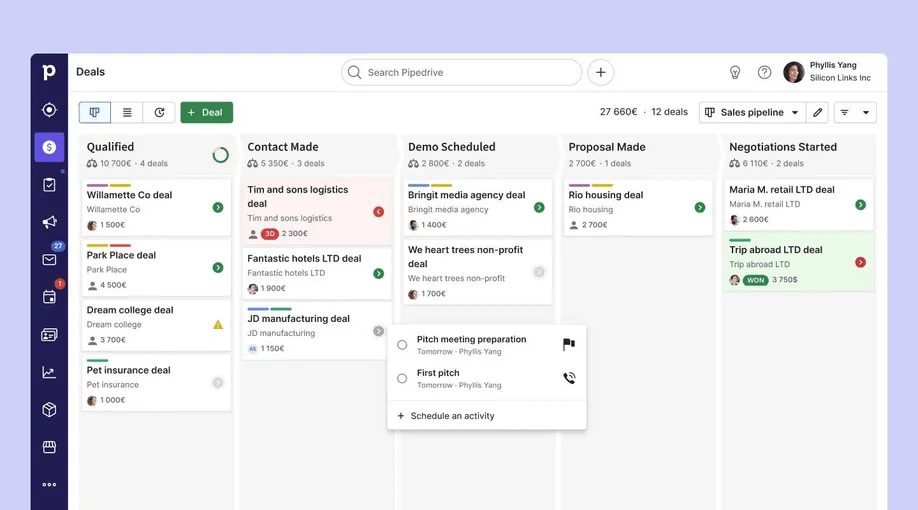
Drag-and-drop Kanban board shows stage, value, and next step at a glance, so you can keep every opportunity moving.

Complex automation and admin bottlenecks.

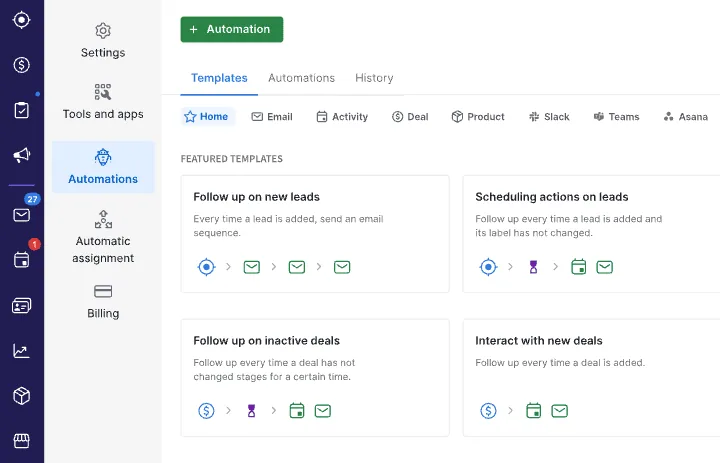
No-code Workflow Automation lets managers set up follow-ups, task triggers, and Slack alerts in minutes.

Pipedrive deals pipeline board
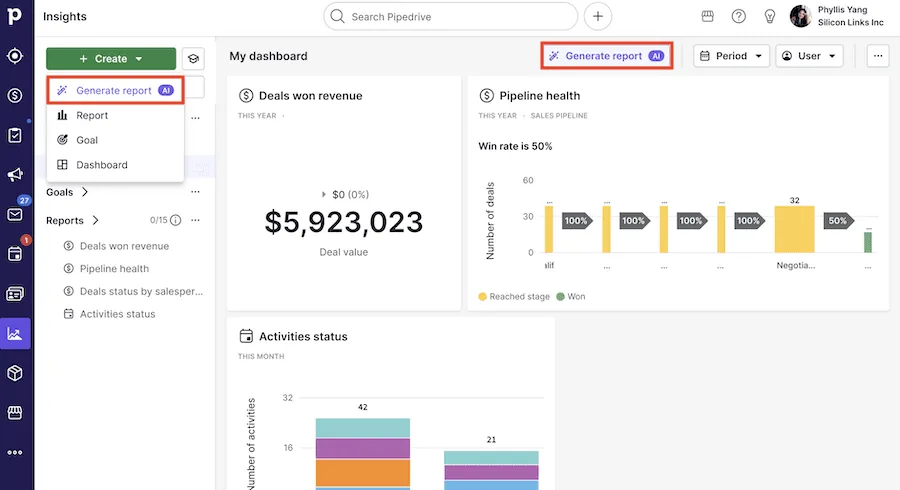
Pipedrive Insights dashboard with deals won and pipeline health
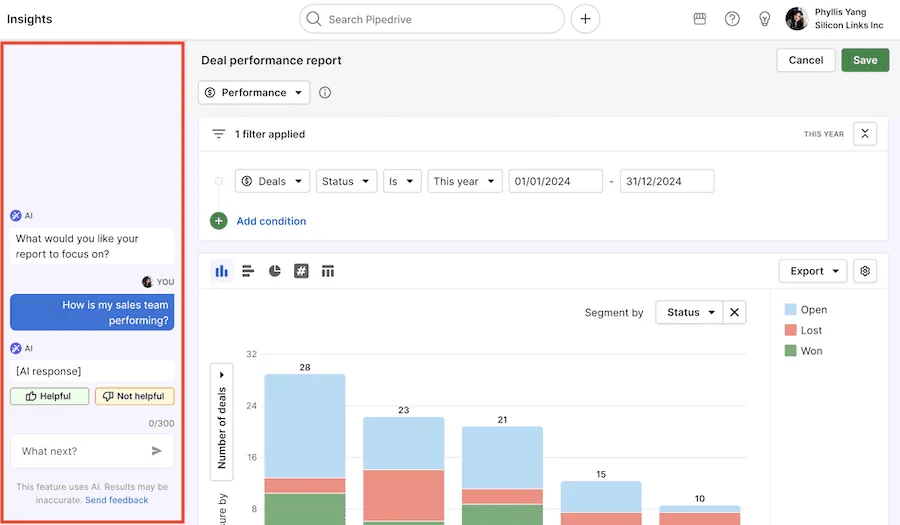
Pipedrive AI report assistant with a deal performance report

Pipedrive’s core CRM features in 2026

Pipedrive is an excellent choice for sales teams seeking a visual, activity-driven pipeline and quick automations to keep deals moving in one place.

Visual pipeline & deal management

  • Customisable, drag‑and‑drop stages.

  • Colour‑coded deal health indicators.

  • Bulk updates.

AI & Pipedrive Nova (new in 2026)

  • Nova: pre‑meeting briefs, meeting recording and transcripts.

  • AI summaries with suggested CRM updates that reps approve.

  • Pipedrive AI: reports and data import; AI email writing from Premium.

Activity & task scheduler

  • Calls, emails, meetings all in one place.

  • Automatic reminders.

  • 2‑way sync with Gmail/Outlook.

Insights & reporting

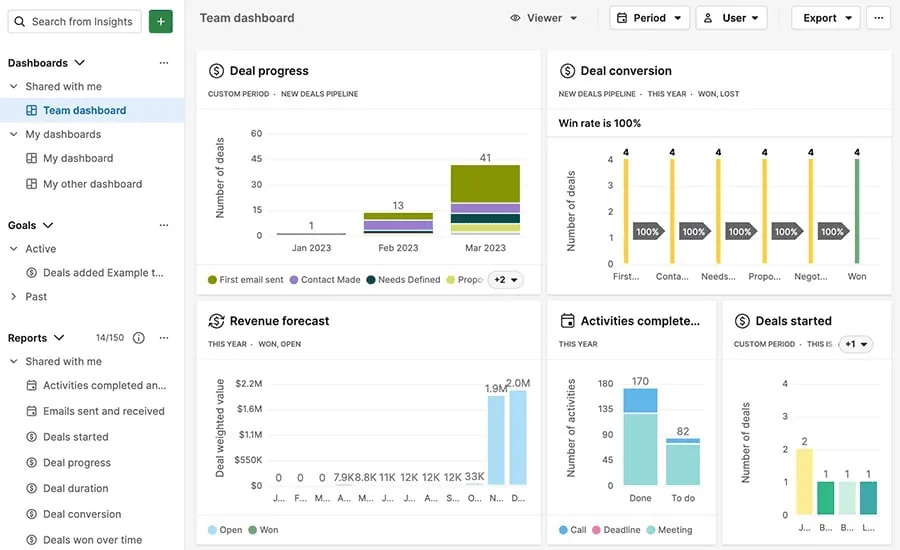
  • Custom dashboards.

  • Revenue forecasting and goal tracking.

  • Team performance reports.

Email, calendar & comms sync

  • Open‑and‑click tracking.

  • Built‑in caller.

  • Built‑in WhatsApp (beta, Growth and up).

App Marketplace & Open API

  • 500+ integrations, plus Zapier, Make and an open REST API.

  • Connect ChatGPT or Claude via Pipedrive’s MCP server.

  • Web forms, chatbot & live chat (LeadBooster, Premium and up).

Workflow automation & Projects

  • No‑code builder for follow‑ups, deal rotations and tasks.

  • Projects: hand won deals to delivery boards (Premium and up).

  • Slack alerts and an automation health dashboard.

When Pipedrive may not be ideal

  • Strict compliance requirements: regulated sectors that demand granular role hierarchies or field‑level audit logs may prefer Salesforce’s higher editions.

  • Complex data needs: organisations with multiple business units, complex CPQ processes, or customised objects will hit Pipedrive’s limits sooner than Salesforce users.

Pipedrive vs. HubSpot / Salesforce Starter & Pro Suite

Where Pipedrive is better than HubSpot / Salesforce:

  • Ease of use & setup: On G2, Pipedrive’s ease-of-use score is level with HubSpot’s (both 8.7, October 2026) - reps onboard in hours.

  • Visual pipeline clarity: drag‑and‑drop Kanban boards with automatic next‑step reminders; less cluttered than multi‑object Salesforce or HubSpot’s multi‑hub view.

  • AI meeting notes included: Nova records and summarises meetings on every plan - no separate note‑taker needed.

  • Affordable seat pricing: plans from $14 per user per month, billed annually; no mandatory implementation. Lower TCO for 3–20‑user teams.

  • Quick‑start automations: no‑code Workflow Automation builder lets non‑tech users create triggers in minutes without admin overhead.

Where HubSpot / Salesforce are better than Pipedrive:

  • Full‑stack marketing & service hubs: HubSpot offers advanced marketing automation, CMS, and service desk in one portal.

  • Built‑in multi‑hub modules: Salesforce Starter & Pro offer sales plus case management and basic marketing tools in one package.

  • Free entry tier: HubSpot’s free CRM and Salesforce’s Free Suite cover up to 2 users; Pipedrive only has a 14‑day trial.

  • Upgrade path inside Salesforce: Starter → Pro → Core → Advanced → Max editions unlock deeper automation, AI, and custom objects as you grow - without migrating platforms.

Who should choose Pipedrive or HubSpot / Salesforce?

Choose Pipedrive if you:

  • Are a B2B sales team of 3–20 reps and want a tool reps actually enjoy using.

  • Need visual pipeline tracking, plus email sync and automations from the Growth plan.

  • Prefer predictable seat pricing without heavy implementation.

  • Pipedrive is best for small-to-mid-size B2B sales teams (3–20 reps) that want a visual pipeline, fast setup, and affordable automations without the overhead of multi-hub suites.

Choose HubSpot or Salesforce Starter / Pro if you:

  • Want an all‑in‑one growth suite (marketing + sales + service) on a single contacts database.

  • Need powerful marketing automation and website/CMS tools alongside CRM.

  • Want a familiar Salesforce interface with out‑of‑the‑box pipelines, cases, and basic marketing email in one place.

  • Prefer easy upgrade paths and integrations with advanced Salesforce features (AI forecasting, custom objects) as you scale.

  • HubSpot / Salesforce Starter-Pro are best for firms seeking an all-in-one CRM with built-in marketing/service hubs and room to scale into advanced automation and analytics.

Pro tips for your Pipedrive launch

Groundwork for a solid rollout:

  • Fix your process first.

  • Agree on precise stage definitions and exit criteria.

  • Centralise contacts and import all leads into Pipedrive.

  • Sync every tool on day one (email, calendar, quoting) and remove duplicates and gaps.

Quick-start playbook:

  • Define a clear, 6–8 stage pipeline that mirrors your buyer journey.

  • Create a field & data‑hygiene policy (e.g. mandatory deal value, close date, owner) so every record stays report‑ready.

  • Set up activity KPIs (calls, emails, demos) and hold weekly stand‑ups or retros to inspect them - mirroring Agile sprints.

  • Connect Nova to your calendar and review its suggested deal updates after each meeting.

Need help implementing Pipedrive the right way?

At Orin, we help you design your Pipedrive architecture, integrate it with email, marketing, and finance, and coach
your team on best practices.

Setting up Pipedrive is only half the battle - you still need pipeline stages that reflect your sales motion, automations
that save time (not create noise), and reporting that leadership can trust.

Talk to our team → Book a quick call and we’ll get your system up and running the smart way.

Book a quick call!

What are the next steps?

  1. 1

    Fill out the form to share your project details with us.

  2. 2

    One of our experts will contact you immediately.

  3. 3

    We'll review your questions and project details together.

  4. 4

    We’ll prepare a quick project calculation or comprehensive proposal for your team.

You can write us a message directly to

hello@oringroup.co.uk

Fill out the form or send us an email. We’ll respond within 24 hours.

Your personal data is protected.